How to Assess: Monitor, Remediate, Contain

How to Assess: Monitor, Remediate, Contain
When you see a vulnerability in ProGet, you’ll find two details:
- A PVRS Category: An assessed severity level based on your environment that describes the theoretical risk of a vulnerability on a scale from 1 to 5, providing a clear indication of the potential severity.
- An Assessment Type: The recommended response to the vulnerability, which will be either Monitor, Remediate, or Contain.

This might seem a little counterintuitive; it’s easy to assume every vulnerability needs to be fixed right away.
But the reality is that not all vulnerabilities should be responded to with the same urgency. Some only pose minimal risk and can be safely ignored, while others demand an immediate response. Effective vulnerability management isn’t just about understanding theoretical risk, but what exactly you should do, and how quickly.
This article break downs the three assessment types: Monitor, Remediate, and Contain, and offer best practices for responding to each. It also shows how to set up and integrate pgutil in your development to assist with vulnerability remediation.
Identifying the Right Response
The typical response to an identified vulnerability is to upgrade the dependency and just move on. But this won’t always solve the problem. If that dependency is already in production, things get a bit more complicated.
Sometimes the risk of the upgrade outweighs the risk that the vulnerability posed in the first place, like if the change introduces regressions or creates instability in production.
ProGet takes a more practical approach to vulnerability remediation. It categorizes each vulnerability against your organization’s risk tolerance and environment, then encourages a response according to one of three assessment types:
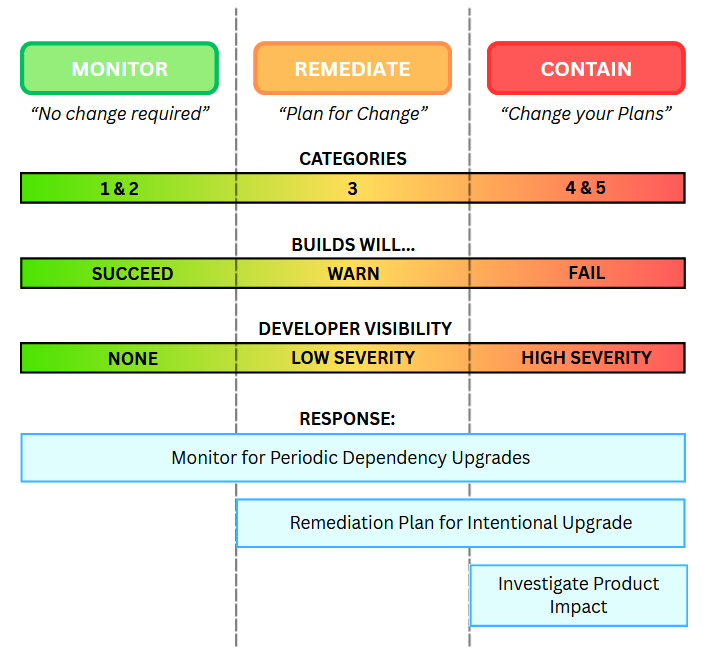
These three assessment types are based on the vulnerability’s PVRS category, which in turn is based on your organization’s specific risk profile. This recognizes that the same vulnerability could require different responses in different organizations, or even teams or environments with varying levels of risk tolerance.
Even though assessments are based on your organization’s risk profile, they won’t always reflect real-world impact. ProGet lets you override the assessment on a case-by-case basis or customize how vulnerabilities are assessed to better match your environment and risk tolerance.
So, with that said, let’s take a closer look at what each assessment type actually means, and their corresponding response.
How to Monitor
When a Vulnerability is assessed as Monitor, it means that no immediate action is required. In previous versions of ProGet, you would have seen this labeled as Ignore, but it was updated in ProGet 2026 to better reflect a more proactive stance.
Many vulnerabilities are assessed as Monitor because they’re theoretical, but by and large not realistic. For example, a vulnerability might only be exploitable under very specific conditions, like processing specially crafted untrusted input in a format or size that your application never accepts or handles. While this vulnerability poses a risk on paper, it’s unlikely to ever be exploited in your real-world environment, and the practical risk is effectively rounded down to zero.
Dependencies are naturally upgraded over the course of development. This is often done intentionally as part of a scheduled update, or automatically when there is a change in a transitive dependency. With this in mind, “Monitoring” simply means making sure those updates continue to happen over time. It’s in line with general development best practices, since aged packages can introduce unnecessary risk.
In ProGet, you can infrequently audit or look out for vulnerabilities with these assessments. The pgutil builds audit command can also show these vulnerabilities during builds, giving visibility even when no immediate action is required. If affected packages aren’t being used by old builds, you can delete them and use retention policies to automatically delete older, cached versions. You can also configure warnings for aged packages; this will not only address these vulnerabilities, but also any new ones. One last option is to just override the assessment after a certain period (for example, two years), which will cause a warning.
How to Remediate
Some vulnerabilities carry a real, non-zero risk of exploitation in your environment. For example, a vulnerability in a web framework that could let someone manipulate requests or access data. This could affect any application exposed to the internet, even if the exact exploit conditions are uncommon. While the dependency will likely be upgraded eventually, the risk is high enough that it’s worth addressing. That doesn’t mean you need an emergency patch or even the very next release, but it does mean something should be planned and scheduled, rather than just pinned as a vague “someday”.
Remediate used to appear in ProGet as “caution“, and involves the same general approach as “Monitor”. However it calls for a more proactive approach, making sure vulnerabilities are addressed intentionally and that developers are aware of them. During builds, the pgutil builds scan command will show these vulnerabilities as warnings, making them visible in CI.

How to Contain
A small number of vulnerabilities carry a very real risk of exploitation. A good example is a Category 5 vulnerability like PGV-2191104 (AKA Log4Shell), where the risk and impact of an attack are both extremely high. These cases are rare, but they require more than just developer visibility.
You’ll need to investigate the potential impact on production, especially since affected applications may already be potential targets for exploitation. Simply upgrading the dependency may not be enough, and a more thorough response will be needed; one that includes assessing production exposure and preparing for active exploitation scenarios.
Contain used to appear as “Blocked” in ProGet, and includes the same steps as Monitor and Remediate, but recommends an extra step; it also involves investigating the impact on production and, in some cases, setting up notifications to alert teams as vulnerabilities are identified.
pgutil will also help here, blocking builds with dependencies that have vulnerabilities assessed as “Contain”. You can also block vulnerable package downloads, though this will have less of an effect, especially when most vulnerabilities are identified in packages already in production.
Conclusion
Managing vulnerabilities is all about responding appropriately based on real risk. ProGet’s assessment model will offer guidance to monitor low-impact issues, remediate meaningful risks, and contain the most severe threats.
To make this work in practice, preparation is an important step. Integrating pgutil into your development and CI processes ensures you always know which applications are impacted by vulnerabilities, and when/what response is needed. Adding notifications for high-severity issues can further reduce response time and keep the right teams informed.
Now that we’ve covered how assessment types guide your response to vulnerabilities, the final article of this guide will cover ProGet’s default assessment behavior and how to override this to better match your environment.