Preparing for a Category 5 Vulnerability

Preparing for a Category 5 Vulnerability
As you use ProGet, you’ve likely seen vulnerabilities in OSS packages flagged with a severity category, with Package Vulnerability Remediation Scale (PVRS) Category 5 being the highest level. These are reserved for issues that demand immediate attention due to their potential impact. A well-known example is PGV-2191104 (Log4Shell), which exposed public-facing systems to full compromise.
The good news is that Category 5 vulnerabilities are pretty rare. But rare does not mean never. These issues have appeared before; and they will appear again. When they do, organizations that are unprepared often struggle to respond quickly and effectively. The difference between a minor incident and a major breach is often down to how well an organization understands the risk and how ready it is to act.
This article explains what qualifies as a Category 5 vulnerability in ProGet and how this differs from a CVSS score of 10. It will then walk through the steps you can take with ProGet to prepare for and respond when a Category 5 vulnerability inevitably appears in your development pipeline.
What is a Category 5 Vulnerability?
ProGet categorizes OSS library vulnerabilities differently than traditional severity ratings like CVSS scores. Instead of measuring theoretical severity in worst-case conditions, it analyzes vulnerabilities in the context of your environment, using a customized risk profile. This means considering factors like network exposure, how a library is used, and the real-world impact on your organization.
Most vulnerabilities are categorized between 1 and 4. They appear severe on paper, but usually require authentication, specific configurations, or unusual conditions within the affected application to exploit. The likelihood of exploitation is low, or the impact is limited by how that application is used. Category 5 is the highest level within this model, reserved for vulnerabilities with significant real-world risk. For example, the Log4J vulnerability:

To qualify, a vulnerability must meet three key requirements:
Requirement 1: Demonstrated Remote Code Execution (RCE)
A Category 5 vulnerability must result in confirmed remote code execution (RCE). RCE is more serious than a full data breach, data tampering, or even a complete service outage, as it lets an attacker run arbitrary code and basically take over the underlying operating system. This will let attackers access other applications, misuse computer resources for things like crypto mining, or establish persistent access to maintain control of the environment. If a vulnerability cannot be used to achieve RCE, it does not qualify as Category 5, regardless of how severe it may appear otherwise.
Requirement 2: External-Facing Application
Category 5 only applies to vulnerabilities in public-facing apps, as defined by your risk profile. These carry a different risk than internal systems, as they let attackers reach the application directly, without needing past access or credentials. The same vulnerability might be categorized differently in an internal-only application, where network controls and limited exposure can make it less likely to be exploited.
Requirement 3: Inedo Reviewed
A vulnerability cannot be labeled Category 5 without being reviewed and validated by Inedo’s security team. OSS library vulnerabilities are often misreported, submitted by third parties with limited understanding of how the library actually functions. A lot of open-source projects also lack a formal vulnerability review process, which can lead to severity ratings that are more theoretical than practical. Category 5 vulnerabilities require independent analysis focused on real-world exploitability and impact, not speculation.
With these criteria in mind, it’s helpful to look at how PVRS Category 5 compares to a CVSS 10.0 rating in practice.
Comparing CVSS Scores & PVRS Categories
The Common Vulnerability Scoring System (CVSS) is designed to measure theoretical severity across a wide range of systems, including full applications and infrastructure. ProGet augments this by categorizing OSS library vulnerabilities based on remediation urgency, focusing on the real-world impact in the context of the application using it.
PVRS Category 5 aligns with a CVSS 10 in representing the highest severity, but the criteria differ. CVSS scores reflect maximum theoretical impact across all contexts, while PVRS Category 5 requires real-world conditions (such as demonstrated RCE). Because of this, many CVSS 10 vulnerabilities do not qualify for Category 5. For example, CVSS 10 includes issues like SQL injection, which can lead to data breaches or application compromise. However, these usually don’t give control over the underlying operating system, which is a requirement for Category 5.
This distinction reflects how ProGet looks at real-world risk: based on how easy something is to exploit and how much control an attacker can gain in that environment. If a vulnerability can’t lead to OS-level compromise under those conditions, it isn’t Category 5.
Examples That Are Not Category 5
These vulnerabilities may allow application-level changes or other serious impacts, but they don’t meet the key requirement of confirmed RCE with operating system compromise, so they don’t qualify as Category 5.
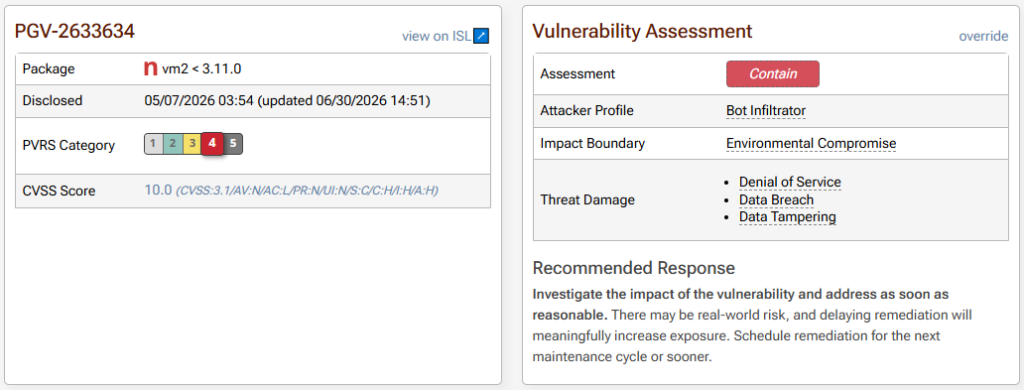
- PGV-2633634 – vm2 Sandbox Escape Vulnerability: This vulnerability is classified as a “sandbox escape” and may allow an attacker to bypass the library’s intended execution boundaries or restrictions. However, this does not qualify as a Category 5 vulnerability as it assumes that the application already allows an attacker to run their own code, with the sandbox being the main protection in place.
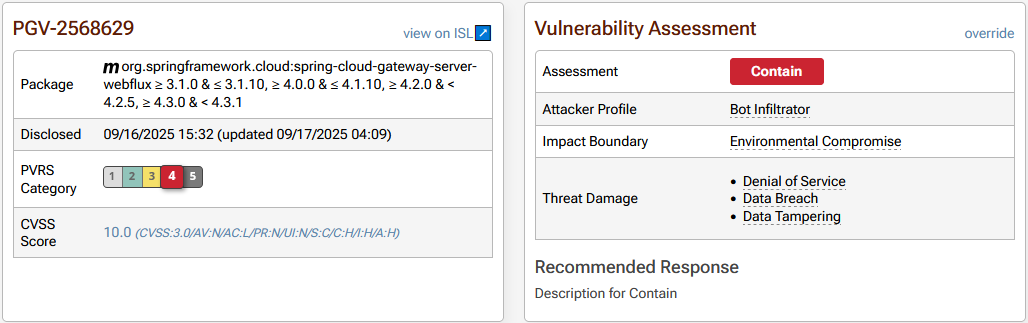
- PGV-2568629 – Spring Expression Language property modification via Spring Cloud Gateway Server WebFlux: This vulnerability allows modification of application behavior, but fails the RCE requirement.
Once you understand what does and doesn’t qualify as Category 5, the next step is knowing what to do when one actually appears, and why preparation is critical.
Preparing for a Category 5
The first step in responding to a Category 5 vulnerability happens before it is ever discovered. When events like Log4Shell occur, organizations often struggle to quickly understand their exposure and move fast enough to respond, unable to answer questions like:
- Which applications are affected?
- How fast can we deploy an updated build?
This is where ProGet’s SCA comes in. It analyzes your builds and their packages, giving you full traceability between open source libraries and the builds that consume them. You can see exactly which builds across your environment have vulnerable packages identified in them.

Using pgutil and pgutil builds scan, you can scan your builds and get them into ProGet’s SCA.
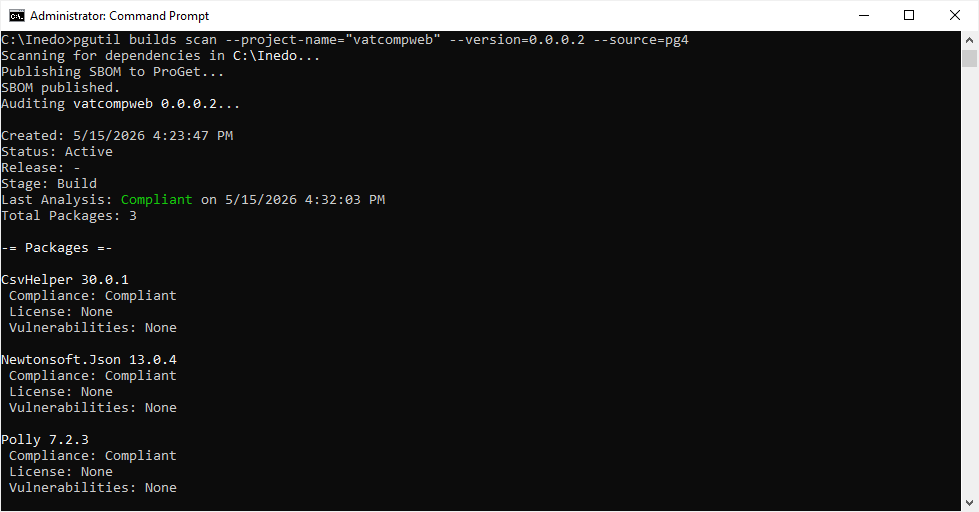
This removes guesswork and prevents time wasted searching through repos, projects, and deployment environments trying to determine exposure. When a Category 5 vulnerability appears, this visibility allows you to go straight from notification to impacted applications.
Equally important is ensuring that builds can move quickly through your environments. With pgutil builds promote, you can mirror builds to your real-life deployments.

On top of this, ProGet’s automated notifications ensure the right people are alerted immediately when a Category 5 vulnerability is identified in your development.
Your release process should also support off-cycle, emergency updates. Well-defined major and routine release pipelines should be flexible enough to accommodate an unscheduled minor release when a Category 5 vulnerability pops up.
Responding to a Category 5
When a Category 5 vulnerability shows up in ProGet, the first thing to remember is don’t panic. Immediate action is required, but that does not mean “establish a war room.” Category 5 vulnerabilities exist in libraries, not in your operating system itself, and you’ll find that the response is typically measured in days, not hours. Immediate action means acting outside your usual maintenance release cycle, accelerating your process, and not just rushing blindly.
By the time word of a Category 5 vulnerability reaches your team, days have often passed since a user first submitted the report. It has likely been reviewed by the library maintainer, aggregated by vulnerability databases, and validated by security teams. These vulnerabilities typically make headlines before they even appear in vulnerability reporting systems. Most Category 5 vulnerabilities have been sitting in code for years; you’re just learning about them now. The real risk begins once the issue is public, as attackers move quickly to exploit it, often within days. With that in mind, here’s how to respond:
Step 1: Identify Impacted Applications
Because you’re already tracking your builds in ProGet, identifying which applications are affected is straightforward. The vulnerable packages in your applications will appear on the vulnerabilities tab, giving you a clear starting point for remediation.

Step 2: Identify Library Usage
Even with a Category 5 vulnerability, not every application that uses the affected library is necessarily at risk. An application’s design and configuration might be enough to mitigate the vulnerability’s exploitability. For example, a public-facing web app may be immune if it does not log HTTP requests or user input, or if firewall rules prevent outbound access from the application. Understanding how the library is used in context allows you to prioritize and apply targeted remediation.
Step 3: Plan for “Immediate” Remediation
In most cases, the quickest and safest fix for a Category 5 vulnerability is to upgrade the library and push out a new build using your emergency release process. However, not every app can be updated right away. If that’s the case, there is usually temporary remediation that can reduce the risk while you work on a proper upgrade. For example, with Log4j, disabling JNDI (the attack vector) could neutralize the issue, or in extreme cases, you might be able to remove the vulnerable code altogether. The idea is to put a short-term remediation in place immediately, then follow up with a proper library upgrade as soon as you can.
Conclusion
Category 5 vulnerabilities are rare, but when they show up, they’re a big deal. Preparation here makes all the difference. If you understand what qualifies as a Category 5, keep clear visibility into where your libraries are used, and have an emergency-ready release process, you can respond quickly and with confidence.
Finding out about a Category 5 vulnerability can feel alarming, but most of the real risk comes from opportunistic attackers targeting unpatched systems. With ProGet, pgutil, and the processes you already have in place, you can contain the issue, roll out remediation right away, and plan upgrades efficiently. This will turn a potential crisis into a controlled, well-managed response.
Now that we’ve covered dealing with the most critical of vulnerabilities, our next article takes a step back and will cover how to manage vulnerabilities that already exist in your builds and applications.