What are PVRS & PVRS Categories?

What are PVRS & PVRS Categories?
When you look at a vulnerability in ProGet, along with the CVSS score, you’ll see a Package Vulnerability Remediation Scale (PVRS) Category and an assessment of the vulnerability.

These are easy to find, but may not be clear what they’re telling you to do.
Applications often rely on hundreds of OSS libraries, many with known vulnerabilities. ProGet will include the CVSS scores for these issues, and tools like npm audit or NuGet audit surface them. This often results in dozens (or even hundreds) of vulnerabilities labeled “high” or “critical.” But when everything appears severe, nothing is, leaving you with questions like:
- Is this vulnerability serious enough to block the package?
- Should we upgrade the dependency before approving it?
- Is it acceptable to ignore it or address it later?
Severity scores reflect the worst-case impact of a vulnerability under ideal conditions, and are primarily designed for full systems. But when working with OSS libraries, teams need to know what to do in their specific environment. Inedo’s PVRS categories build on CVSS scores by incorporating real-world exploitability, business impact, and the risk of making changes, providing guidance on how and when to respond.
This article explains what the PVRS categories mean, why severity scores often fall short for OSS libraries, and how PVRS provides guidance that focuses on actionable responses over abstract scores. It will also show you how to set it up in ProGet and how it uses your tailored risk profile to help you make prioritized decisions about which vulnerabilities to address and when.
Why PVRS Is Opinionated
Typical vulnerability severity scores are an answer to the wrong question. They focus on how severe a vulnerability is in theory, but don’t consider whether it actually matters in your environment. A critical vulnerability in a rarely used library might pose less risk than a minor vulnerability in a heavily used dependency, but severity scores will treat them the same. PVRS categories were made to address this gap, and it is deliberately opinionated: it’s not here to produce yet another numerical score because these alone cannot capture real-world risk.
PVRS categories don’t replace CVSS scores; they build on them using your organization’s risk profile. Instead of scoring vulnerabilities by severity, it places them into categories that recommend what action to take and when. PVRS categories are based around four core principles:
OSS Library Mindset: PVRS categories are designed for OSS libraries, not end-user applications like Adobe Reader. It assumes you’re dealing with transitive dependencies (like a PDF processing library inside your application) where the risk depends heavily on how your software uses that component.
Change Is Risk: Security fixes are not “free.” Upgrading a library can ripple across direct and transitive dependencies, introducing instability or requiring regression work. In some cases, doing nothing is the better choice when remediation risk outweighs exploit risk. Many libraries are upgraded during planned development cycles anyway; rushing changes outside those cycles can create unnecessary operational risk.
Realistic Security: Most organizations are not defending themselves against nation-state actors or terrorists; they’re just mitigating practical, common threats. For them, “effective security” looks more like “locks, cameras, and keycards”, not “armed guards and blast doors”. The kind of security they are aiming for is safeguards like sensible application isolation (for example, not running apps as domain admin), rate limiting and bot protection for public-facing systems, and a tested off-site backup and recovery plan.
Context Is King: PVRS categories don’t produce a single “one-size-fits-all” score. Instead, it categorizes vulnerabilities based on environmental and risk factors specific to your organization. This means that the remediation guidance is tied to your actual exposure and impact.
PVRS categories are designed to provide guidance in a way that a raw severity score can’t. They focus on what to do and when, instead of offering just numbers.
PVRS Categories
Unlike traditional severity scores, PVRS categories prioritize action over severity. It maps vulnerabilities into five categories that guide when to remediate, factoring in remediation risk, real-world exploitability, and the environment in which the library runs.
Let’s say you have two vulnerabilities with the same CVSS score (9.4). One is in a logging library limited to an internal network and running with low privileges; the other affects a file upload component exposed to the public internet. Traditional scoring treats them as equally severe, but in practice they aren’t. ProGet would likely categorize the internet-facing issue for immediate remediation, while scheduling the internal logging issue for a routine upgrade cycle. Same score, different urgency.
ProGet assigns vulnerabilities one of the following five categories:
Category 1: No Special Action Required
- Guidance: None
- There is no real-world risk, and the vulnerability is not practically exploitable. The risk introduced by remediation (upgrading, etc) likely exceeds the risk posed by the vulnerability.
Category 2: Address in Next Major Release
- Guidance: Plan, but do not rush.
- There is low real-world risk, as vulnerability exploitation is unlikely or highly constrained. Wait until a major release where breaking changes are already expected, and other library upgrades are either planned or already occurring.
Category 3: Remediate in Upcoming Maintenance Release
- Guidance: Schedule intentionally
- There is moderate real-world risk, but does not justify the immediate disruption caused by remediation. Evaluate carefully and schedule into an upcoming maintenance cycle.
Category 4: Remediate in Next Maintenance Release
- Guidance: prioritize / fast-track, using standard maintenance release procedures
- There is high real-world risk, and delaying remediation will meaningfully increase exposure. Having said that, it is not critical enough to justify dropping everything or bypassing standard procedures.
Category 5: Remediate Immediately
- Guidance: Act outside the normal release cycle
- There is immediate and unacceptable risk with a high likelihood of vulnerability exploitation. Delaying remediation significantly increases the chance of compromise.
Note: Category 5 is intentionally rare and requires not only vetting by Inedo for real-world impact, but also for a certain risk profile.
With PVRS, it’s not just about the vulnerability itself; it’s about where and how it exists in your environment.
What is a Risk Profile?
ProGet requires a clear understanding of your environment and the potential impact to categorize a vulnerability. It evaluates a set of risk factors that capture the real-world context of your organization’s software and development environment. These consider how the library is used, how accessible it is, and what the consequences of a successful exploit might be. By combining these with the characteristics of the vulnerability, ProGet categorizes it, considering both urgency and practicality.
ProGet looks at five primary risk factors:
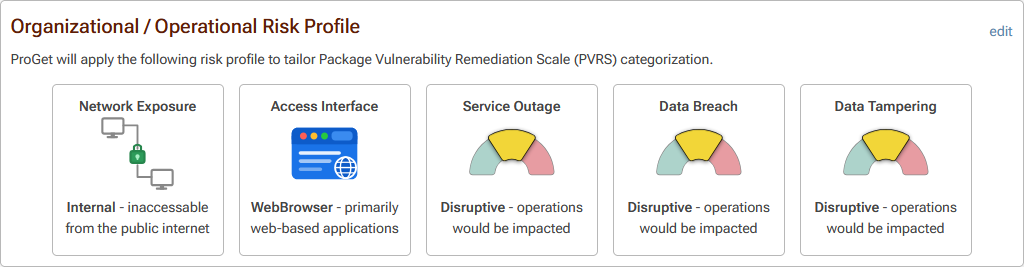
Network Exposure: Where can this application be reached from?
- Internal: Inaccessible from the public internet
- External: Accessible from the public internet
Access Interface: How would someone actually interact with the vulnerable piece?
- WebBrowser: Primarily web-based applications
- Not-Web: CLI, desktop apps, etc…
Service Outage Impact: If this gets exploited and causes downtime, how bad would that be?
- Tolerable: Annoying, but the business keeps running.
- Disruptive: Causes real operational pain and needs attention.
- Unacceptable: Serious impact on the organization.
Data Breach Impact: If data is exposed, what’s the fallout?
- Tolerable: Low-sensitivity data with limited consequences.
- Disruptive: Sensitive data with meaningful impact.
- Unacceptable: Highly sensitive or regulated data with major business risk.
Data Tampering Impact: If someone can alter data, what happens?
- Tolerable: Minor or limited integrity issues.
- Disruptive: Meaningful impact on the business.
- Unacceptable: Critical integrity failures, like financial, safety, or system-wide trust at stake.
This risk assessment is baked directly into ProGet, which uses the existing risk profile to automatically categorize the appropriate remediation for each vulnerability. This gives immediate, actionable guidance on handling the vulnerability. From there, it can be configured specifically to your organization’s own risk profile.
Configuring Your Risk Profiles
The risk profile can be found in ProGet’s Package Policies settings. On your first visit, you’ll see that it will be configured with the default values:
- Network Exposure: Internal
- Access Interface: WebBrowser
- Service Outage: Disruptive
- Data Breach: Disruptive
- Data Tampering: Disruptive
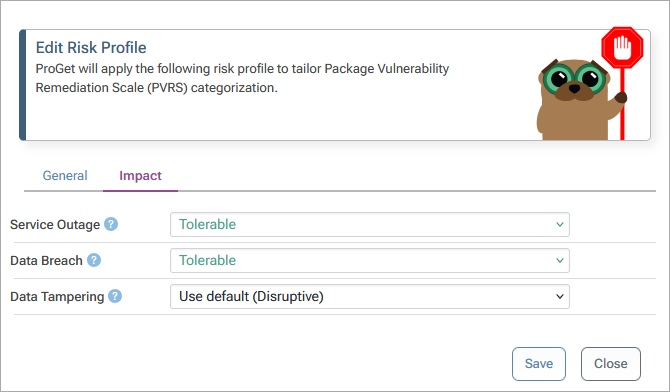
These can be configured based on your own organization’s risk profile. For example, our example organization here has changed Service Outage from Disruptive to Tolerable as this application is an internal reporting dashboard used only by back-office staff, and also set Data Breach to Tolerable because it contains no customer or regulated data, only aggregated operational metrics.
Now, take the vulnerability PGV-2605591 in the Lodash package, which lets an attacker pass crafted paths, causing Lodash to delete methods from global prototypes. Under the default risk profile, this would be a Category 4, based on the assumption that the application might process untrusted input:

In our example profile, though, this doesn’t really apply. There isn’t a realistic way for untrusted files to enter the system, and even if something did go wrong, the impact would be limited. Because of that, this vulnerability would be a Category 2, due to the low likelihood and relatively minor impact in this environment.

Sometimes you’ll find that different groups or departments will require their own risk profile. For example, an internal data analytics team running scheduled reporting dashboards may configure Service Outage as Tolerable because temporary downtime does not immediately impact customers or revenue. ProGet allows you to configure feeds with their own individual risk profiles. These can be created at feed level:

Conclusion
Vulnerability severity scoring isn’t designed to provide the answers developers really need, especially for OSS libraries where context, risk, and change impact must be considered. ProGet steps in by complementing these scores with practical, actionable guidance, using risk profiles to categorize vulnerabilities based on real-world exploitability, business impact, and remediation risk. This helps teams make informed decisions about what to fix and when.
PVRS categories turn noisy vulnerability reports into clear and structured remediation guidance. Teams can configure their risk profiles, see how their environment influences remediation, and follow clear guidance for each vulnerability.
Now that we’ve covered what PVRS categories are and how they guide remediation decisions, in the next article we will look more closely at how they build on CVSS scores to provide that context.