Blocking & Containing Vulnerable Packages

Blocking & Containing Vulnerable Packages
ProGet lets you block downloads of vulnerable packages by assessing them as non-compliant, preventing them from being used in production. This makes a lot of sense when it comes to OSS package management; If a package is known to be unsafe, prevent it from being used in new builds to reduce risk.
But while blocking downloads can help, it’s only part of the picture when it comes to keeping vulnerabilities out of production. Most of the risk doesn’t come from the next package you download; it comes from the packages you’ve already downloaded, deployed, and are currently running in your pipelines and applications. Blocking alone doesn’t address the exposure you already have. What you really want is containment: identifying and remediating the vulnerabilities already in your systems.
This article will talk about the place blocking packages has in vulnerability management, but why containment is, in most cases, the more effective way to manage real-world risk. It also covers how scanning, auditing, and context-aware control at the build and release stage give teams the visibility and control they need.
What Download Blocking Can Do
Download blocking is an established approach to keeping unsafe packages out of your environment. If a package has a known vulnerability, blocking it stops it from entering production and being used in your builds. This can be very useful in certain situations:
💡 Stopping newly disclosed critical vulnerabilities: Keeping high-risk packages from getting into production in the first place.
💡 Enforcing security or compliance policies: Making sure only approved dependencies get used.
💡 Teams without mature CI/CD pipelines: Adding a basic layer of protection when automated scanning isn’t in place yet.
The takeaway here is that blocking packages is effective for controlling future risk. But it doesn’t address what’s presently in use: the vulnerable packages in your builds, pipelines, and production. Setting up download blocking won’t do much to prevent the risk from this.
Limitations of Download Blocking
Download blocking is presented as a straightforward solution: prevent unsafe packages from being used, and you reduce risk. But it falls short in two ways:
- It gets in the way of how developers build and ship software
- It doesn’t address real-world exposure
⛔ Issue 1: It Disrupts Development
When a package is blocked, it shows up as a failed build with little context. Developers can see something is wrong, but not how serious it is or what to do next. It becomes a hard stop in the middle of their workflow. This comes at the worst possible time, during development or build when teams are trying to test or deliver changes. They now need to investigate the issue, find alternatives, or escalate to another team.
What you’ll find is this kind of friction leads to workarounds. Developers may manually source packages, use unofficial mirrors, or bypass controls entirely just to keep things moving. This can introduce the kind of risk blocking aimed to avoid in the first place.
Another problem is the lack of context. Not all vulnerabilities are equal, but blocking treats them the same. Developers can’t easily tell whether something is critical, exploitable, or even relevant to how the package is used.
⛔ Issue 2: It Doesn’t Address Real-World Exposure
When a vulnerability is disclosed in a library your team has been using for months and possibly already in production, things change quickly. Details become public, a CVE is assigned, and what was previously unknown is now something attackers can actively exploit. At that point, the focus shifts to understanding your exposure and deciding how to respond. Questions like these come up:
- Which applications are affected?
- Where is the vulnerable library actually in use?
- How quickly can we respond?
Download blocking cannot provide these answers. It only affects what gets downloaded next, not what’s already in use.
Containment, on the other hand, focuses on understanding and managing risk in the software that’s already built and deployed. It provides the visibility needed to answer these questions, assess real exposure, and take action. Containment surfaces issues during the build and release process with the information needed to act on them. Developers can see what’s wrong, understand the impact, and fix it without being abruptly stopped.
Containment shifts vulnerability management from guesswork and interruption to something informed, actionable, and aligned with how teams build and ship software.
How Containment Works
Containment is implemented at the build stage, where teams have full visibility into the composition of their applications. By focusing on the point where software is deployed, you can identify, assess, and remediate vulnerabilities before they reach production.
In ProGet, containment involves three key steps:
1. Running pgutil builds scan in release pipelines to detect vulnerabilities in your builds. This can not only be run to scan initially, but also to check your builds at a later date.
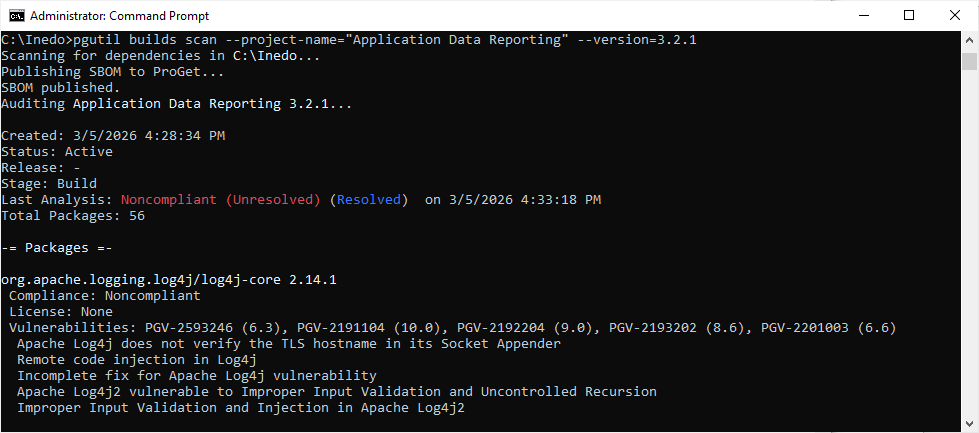
2. Running pgutil builds audit right before deploying to production as a final check to catch any vulnerabilities that may have surfaced since you originally ran pgutil builds scan.
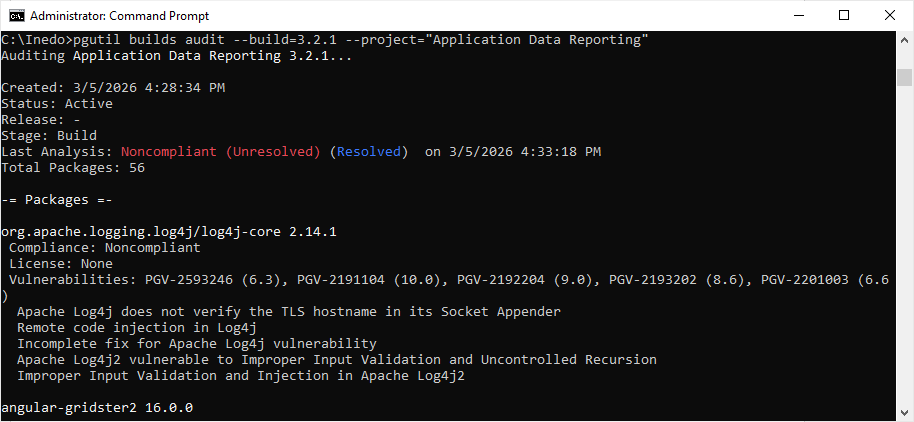
3. Continuing to monitor for non-compliant builds by setting up notifiers in ProGet to alert your team when a previously compliant build has been flagged due to a newly disclosed vulnerability.

This approach gives you:
⭐ Clear visibility into what’s actually included in each build
⭐ The ability to trace where each library is used across applications
When developers add new dependencies, issues show up during the build process instead of being blocked upfront without context. This gives developers guidance they can act on early, without disrupting their workflow. From there, teams can audit builds before release, monitoring for newly disclosed vulnerabilities.
Developers remain in control of their workflow while receiving information needed to make decisions. Instead of being blocked, they are informed, with clear visibility into what’s in their builds and how it impacts risk. This end-to-end visibility is what enables containment, reducing the impact of both new and existing vulnerabilities. That said, there are still situations where blocking downloads makes sense.
When to Block Downloads
While containment is the more effective long-term strategy, blocking downloads can still be used as a targeted or temporary control, even when it’s not your main approach for managing vulnerabilities. Common scenarios where download blocking can make sense include:
- No CI/CD environments: For example, data scientists or analysts running scripts directly from their workstations, where builds never pass through automated pipelines.
- Temporary stopgap: While integrating scanning and auditing tools like pgutil into pipelines, download blocking can provide a short-term safety net.
- Compliance or top-down security requirements: Some organizations require blocking by policy, even if it isn’t the most effective technical solution.
In these cases, download blocking provides a basic level of protection, preventing known critical vulnerabilities from being introduced. However, it should always be paired with containment, or at the very least, intention to implement it. Without visibility into what’s already deployed, blocking vulnerable packages alone will never fully protect production systems or reduce real-world risk.
Conclusion
Blocking vulnerable packages can help prevent new risk from entering your environment, but it can’t do anything about the vulnerabilities that may already exist in production. It doesn’t help that the majority of real-world risk lives in what’s already deployed. This is why containment is the more effective approach.
By focusing on scanning, auditing, and context-aware decisions at the build stage, it manages risk where it actually exists. It provides visibility into both new and existing vulnerabilities, making it easier to respond quickly and make informed decisions. ProGet and pgutil support this approach, helping teams control what enters their environment while also identifying what’s already there and helping you remediate it.
Now that we’ve looked at how containment helps manage vulnerabilities already in your systems, we need to understand how ProGet guides your response to those vulnerabilities in practice.