Vulnerability Management: Customizing

Note: This preview of “Vulnerability Management Done Right with ProGet” reflects features and functionality planned for the upcoming ProGet 2026 release.
Customizing Assessment Types In ProGet
ProGet uses your tailored risk profile to automatically assess vulnerabilities as Monitor, Remediate, or Contain.
However, a vulnerability’s actual impact depends on how a dependency is used within an application. Because of this, you can override assessments on a case-by-case basis or define custom assessment types to better reflect your environment.
The final chapter of Vulnerability Management Done Right with ProGet will walk through how ProGet identifies and assesses vulnerabilities and how its default behavior is designed to guide developers on how to best respond. I’ll also show how teams can override vulnerabilities and customize their vulnerability assessment behavior to match their environment.
Vulnerabilities and Assessments in ProGet
Inedo Security Labs aggregates vulnerability records from multiple sources and associates them with known vulnerabilities in open-source packages. ProGet uses an offline version of this database to identify and assess vulnerabilities in ProGet.
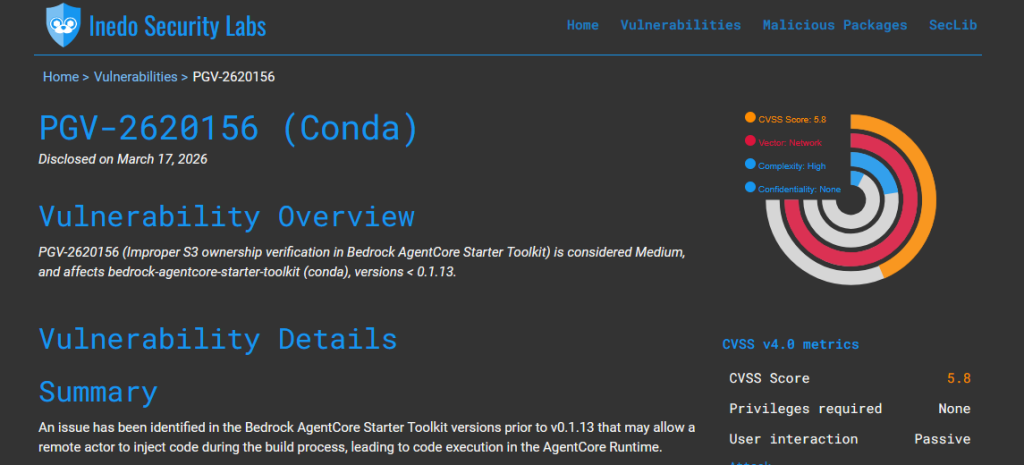
When you see a vulnerability in ProGet, it means that it has been identified in one of your feeds, in a package either downloaded or cached through a connector. This package could represent a widely used dependency across many applications, or simply be something downloaded once, with little ongoing impact.
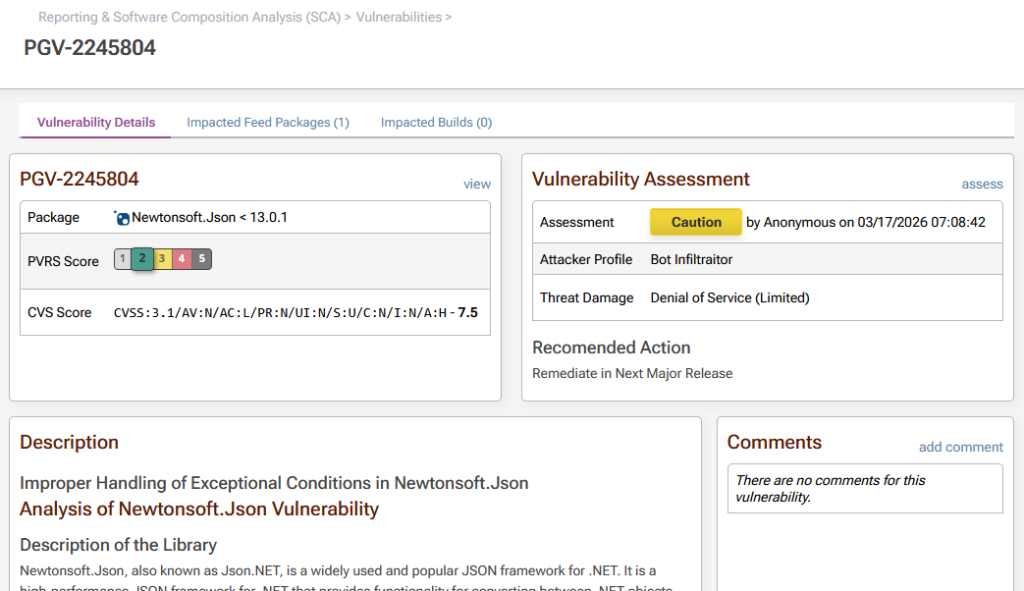
By the time you see it, ProGet will have automatically assessed the vulnerability as either Monitor, Remediate, or Contain, indicating the recommended responses. These assessments also determine how vulnerabilities are shown in the UI, act as quick visual indicators of risk, and control what is emitted to tools like npm audit or NuGet audit.
These will also define whether a package is considered compliant, a warning, or non-compliant based on the policies you have set up in ProGet. Comments can also be manually added to communicate any decisions or guidance across teams.
ProGet’s Default Behavior
ProGet’s default behavior assumes a typical environment where teams do not have dedicated resources to continuously monitor vulnerabilities and enforce compliance. This provides meaningful guidance without requiring constant oversight, while still allowing you to make exceptions and override them when necessary.
Overriding Assessments
Even with these defaults, not every assessment will accurately reflect real-world impact. ProGet assesses vulnerabilities based on their severity, but that doesn’t always reflect how a dependency is actually used by your application. For example, a vulnerability in a PDF library that’s only exploitable when parsing untrusted input poses no real risk if your organization uses it solely to generate documents or handle trusted internal data.
This is where overriding comes in. You can manually change these automatic assessments based on how your applications are used, and the real-world impact of the vulnerability in your environment.
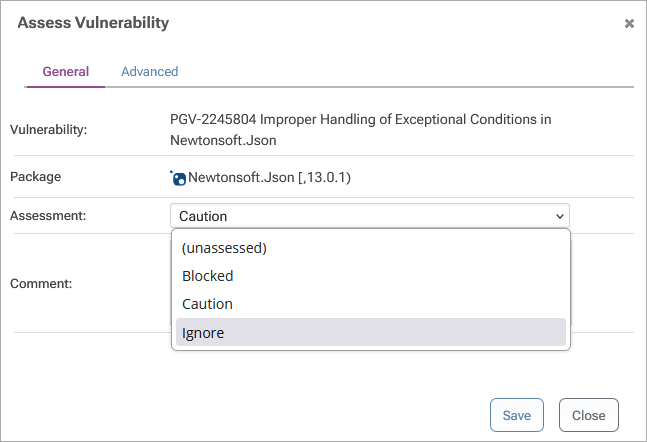
When overriding an assessment, you can also scope the override to a specific project or policy. This lets teams respond differently to the same vulnerability based on their own environment and how the dependency is used.
ProGet’s Default Assessment Types
To understand how these defaults and overrides work in practice, it helps to look at how ProGet handles vulnerabilities in the first place.
Vulnerabilities are automatically assessed using a simple model that requires little training to understand. An assessment type is based on a vulnerability’s PVRS category, translating severity into clear responses:
- Categories 1 & 2 – Monitor (Green): These vulnerabilities are generally low impact and safe to leave alone, and are often suppressed to reduce alert fatigue.
- Category 3 – Remediate (Yellow):Action is recommended when feasible, but immediate remediation is not always required.
- Categories 4-5 – Contain (Red): High-risk issues that should be addressed with a high degree of urgency, potentially breaking builds if ignored.

These assessment types reflect how urgently a vulnerability should be addressed. Most are assessed as Monitor, meaning that no immediate action is required, and are often suppressed to reduce distracting alerts. Vulnerabilities assessed as Remediate or Contain are surfaced to developers, and apply to vulnerabilities that need to be addressed with much higher urgency.
Tailoring Assessment Behavior & Process
ProGet’s default behavior can be customized to better align with how your organization actually uses dependencies.
Manual Assessments
Assessment Types can be configured to be manually assessed rather than auto-assessed by default. Vulnerabilities assessed this way will be shown as “unassessed”, are treated as non-compliant, and may result in build warnings or failures. Manual assessments should be intentional; for example, when vulnerabilities of a given assessment type are reviewed individually before being accepted.
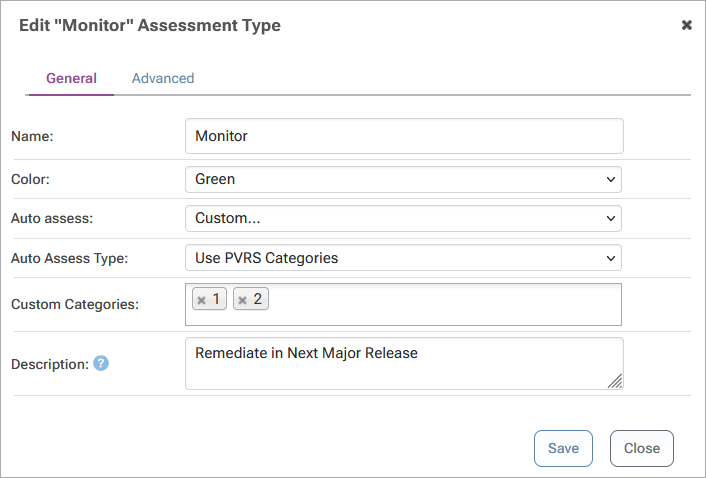
Suppressing Distracting Alerts
Development tools like npm audit or NuGet audit report all vulnerabilities automatically and without context, leading developers to instinctively upgrade dependencies, even when the vulnerability poses no actual risk. This can introduce breaking changes or instability, creating more problems than the vulnerability could have potentially caused itself.
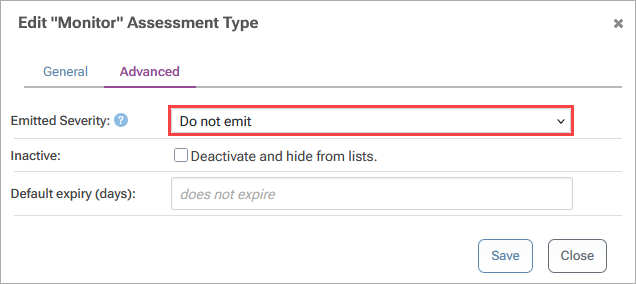
When ProGet and pgutil are integrated into your development and are already identifying and assessing vulnerabilities, this type of reporting becomes less useful. You can control what gets reported by configuring which assessment types are emitted; for example, suppressing “Monitor”, while still reporting “Remediate” and “Contain”. This reduces distracting alerts while keeping severe vulnerabilities visible.
Creating Additional Assessment Types
Assessment types are meant to describe a response, like “Monitor”, “Remediate”, or “Contain”. For some organizations, these responses may not provide enough direction. In this case, you can create additional assessment types to better describe how and when your team should respond to vulnerabilities.
However, you should only create assessments when there is a well-defined, matching process behind them, clearly indicating what action needs to be taken and who is responsible. Broadly speaking, there are two main cases you would want to create your own assessment types:
👉 Case 1: More Granular Assessment Types:
ProGet simplifies vulnerability urgency into a smaller set of assessment types, but you may want to create assessment types that reflect all five PVRS categories or align them with the CVSS scoring system.
This can be especially useful in certain environments where, for example, teams with structured release cycles may need more precise guidance on when vulnerabilities should be addressed, since fixes may need to be planned into specific releases rather than applied immediately.
👉 Case 2: Triage-Based Assessments
Teams may choose to manually review vulnerabilities to decide how to respond, especially for severe issues. For example, a team might want anything labeled “Contain” to be reviewed first, rather than assigned automatically, to avoid triggering build failures. In this case, “Contain” is set to “manually assessed” to make sure a vulnerability is only assessed as this after it has been reviewed and confirmed to require that response.
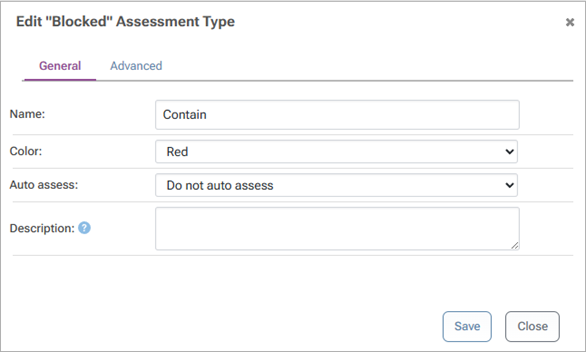
To make this work, a separate assessment type like “Review” can be created as a “triage”. Vulnerabilities that would be assessed as “Contain” by default are assessed as this instead. This creates a clear list of vulnerabilities to be reviewed before being manually assessed, keeping them visible and preventing them from being treated as non-compliant.
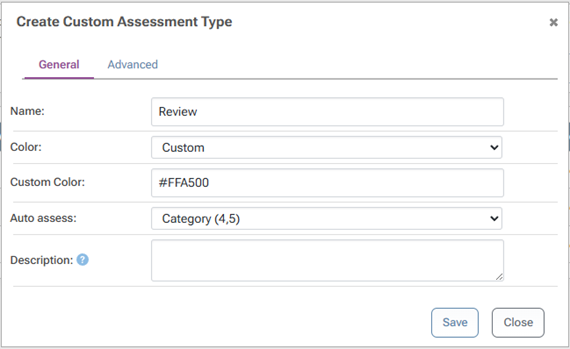
To keep things moving, this assessment type can be set to expire after a certain amount of time. If no manual assessment is made, the vulnerability becomes unassessed, ensuring it gets revisited and doesn’t sit indefinitely.

Making Vulnerability Assessments Work for You
ProGet provides useful guidance by automatically assessing vulnerabilities based on your risk profile. However, those assessments are still based on generalized assumptions about how dependencies are used. This can lead teams to overreact to theoretical risks or overlook issues that have a greater real-world impact.
By overriding assessments when needed and tailoring assessment behavior to match your environment, you can make that guidance more accurate and actionable. You can also customize assessment types or suppress distracting alerts, all of which help keep your focus on what actually matters.