Curation in ProGet for Artifactory Users

Curation in ProGet
Curation manages vulnerabilities in your development pipeline using configured policies and exceptions. Most developers block packages with high CVSS scores, however, these scores alone won’t tell you what you should actually do when a newly discovered vulnerability is already in your builds.
You need a realistic view of urgency and clear next steps when dealing with both existing and newly discovered vulnerabilities. ProGet scans your OSS packages according to your policies, and also delivers actionable guidance tailored to your organization and projects.
In this article, I’ll cover why managing vulnerabilities requires more context beyond just severity scores, and how ProGet’s automated scanning provides guidance on how to respond to vulnerabilities. I’ll also show you how customizing and overriding assessments works in ProGet.
Curation Without Context
Artifactory relies on two separate components (Curation and Xray) to control and detect vulnerabilities at different stages, so achieving full supply chain visibility means managing both features. Jfrog’s vulnerability database includes:
- An aggregated severity rating
- Code-level context on whether a vulnerability applies to your project
- Recommended upgrade version
This isn’t much more than you’ll find on GitHub or the NVD. Like CVSS scores that are designed to reflect the worst-case scenario of exploitation, JFrog’s severity rankings don’t offer clear guidance on how or when to address a vulnerability based on its real-world impact on your environment. It overlooks important factors like how your application is used and who can access it, lacking the context needed to determine whether a vulnerability is truly impactful, even if it appears exploitable on paper.
It also offers no clear guidance on how to respond, whether that means delaying a fix or upgrading immediately and risking broken builds. Vulnerabilities are often discovered in packages only after they’ve already in your builds. When that happens, developers are forced to make quick decisions without an answer to the important question:
“What should I do, and when do I need to do it?”
Understanding the real-world risk of a vulnerability means considering the impact it can have in your environment, and how the dependencies it affects are used by your applications. These determine what action to take and how urgently you’ll need to take it.
Curating OSS Packages in ProGet
ProGet automatically scans OSS packages for vulnerabilities, assessing them based on your organization’s tailored risk profile. Any non-compliant packages will be prevented from being used by developers in production:

ProGet categorizes vulnerabilities based on real-world impact and likelihood of exploitation, as well as a tailored risk profile of your organization. You’ll find a default risk profile configured in Global Policies, one that assumes you aren’t dedicating resources to continuous vulnerability monitoring and management. This risk profile can be tailored to better align with your organization:

The five PVRS (Package Vulnerability Remediation Scale) categories provide guidance on when to remediate the identified vulnerability based on this risk profile:
- Category 1: No Special Action Required: For vulnerabilities that aren’t exploitable, remediation will likely cause more problems than it solves.
- Category 2: Monitor: Low risk vulnerabilities should be planned for, but remediation can wait until the next major release.
- Category 3: Remediate in Upcoming Maintenance Release: When vulnerabilities aren’t immediately disruptive but pose real-world risk, fixes should be planned intentionally, addressing them in an upcoming release.
- Category 4: Remediate in Next Maintenance Release: Fixes should be fast-tracked, as any delays in time increase risk exposure.
- Category 5: Remediate Immediately: Although rare, when vulnerabilities pose immediate risk, remediation should be applied right away, even if this happens to be outside the normal release cycle.
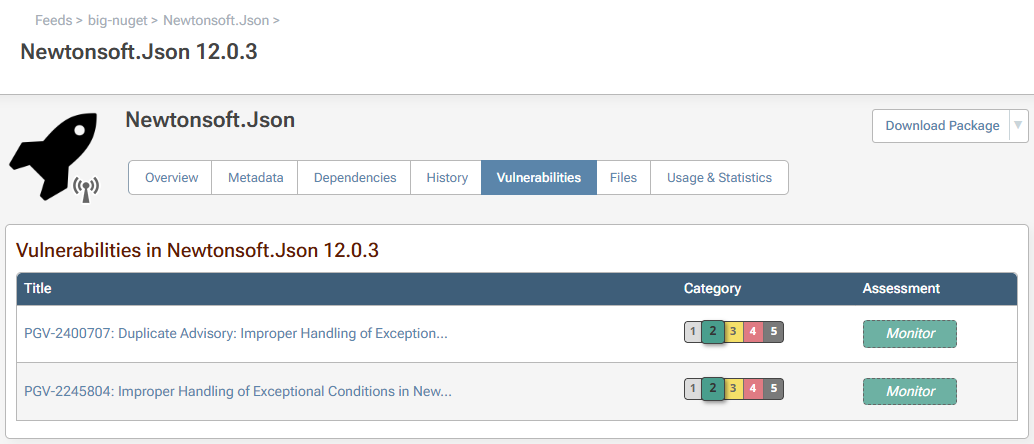
ProGet then assesses vulnerabilities based on these categories as either Monitor, Remediate, or Contain, with each assessment type encouraging an appropriate response to that vulnerability:
- Monitor: Risk is low, so there’s no need to act right away. Monitor the vulnerability and take care of it during normal updates.
- Remediate: The vulnerability poses a real non-zero chance of risk, so implement a plan to fix it, and ensure it’s not overlooked.
- Contain: The vulnerability presents a significant and immediate risk; act quickly, look at the potential impact on what’s in production, and be ready to deal with active threats.

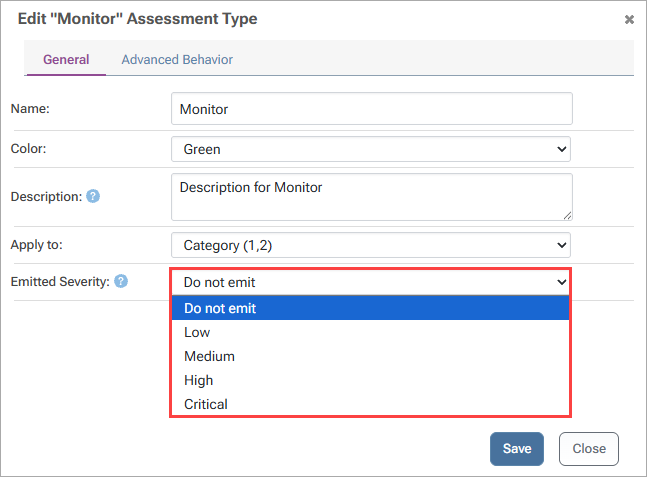
Assessment types can be customized in ProGet to better fit your organization, as well as suppressed when running tools like NuGet Audit and npm audit by changing the emitted severity. This suppresses any unnecessary noise from alerts, which in turn amplifies true risk:
While ProGet will provide advice for handling vulnerabilities, ultimately you will still want to decide what’s used in your builds. Overriding assessments at the vulnerability level allows packages to be used if you determine that they contain vulnerabilities that pose little risk:
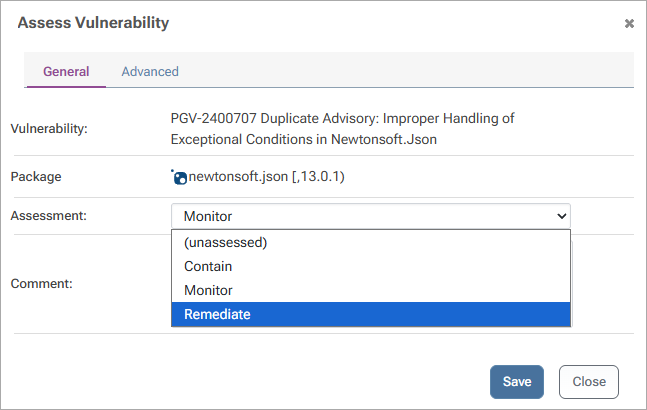
And, if you want to check back in on any overridden assessments later, simply set an expiration date, preventing the vulnerability from being used in builds indefinitely:

Actionable Vulnerability Guidance with ProGet
ProGet scans and blocks OSS vulnerabilities automatically, before and after they enter your repositories. It provides guidance, letting you know what needs remediating now and what vulnerabilities don’t urgently need your attention.
ProGet comes with these features out of the box, categorizing vulnerabilities via PVRS based on risk profiles you configure to provide meaningful guidance on how to respond to vulnerabilities, and letting you override assessments at the vulnerability level when the risk is minimal.
Beyond managing vulnerabilities, ProGet allows you to manage your licenses, explained in the following article, Package Licenses and Compliance.