Managing Your Storage with Retention Policies

Managing Your Storage with Retention Policies
When migrating to ProGet, you’ll need to know how ProGet stores data and how its own retention policies work.
This article will break down ProGet’s modern approach to data storage and and retention policies, helping you migrate and set everything up.
Data Storage in ProGet
Determining which files and folders correspond to your artifacts can be confusing in Artifactory’s Filestore , which uses artifact SHA-1 checksums as their file names, placed in a folder named after the first two digits of this checksum:
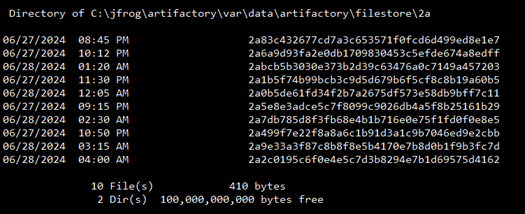
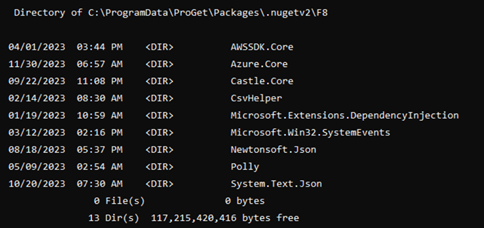
ProGet stores files in folders locally and in the cloud “as is”, with easily recognizable folder and file names. Your Newtonsoft.Json 13.0.3 package can easily be found as Newtonsoft.Json.13.0.3.nupkg, instead of f3a1c9b2e7d8f5a6c4b9d2e3a1b8f0c6d9e8f7a3…
Cold Storage Alternatives in ProGet
ProGet lets you set up retention in a similar way to Artifactory’s Cold Storage, moving your packages to a separate instance using a combination of replication, retention policies, and connectors.
Setting this up can be done on the same server or a different one by following these steps:
- Set up Feed A on regular disk storage.
- Create Feed B on more affordable cloud storage.
- Use replication to push from Feed A to Feed B.
- Set up a Connector to connect Feed A to Feed B.
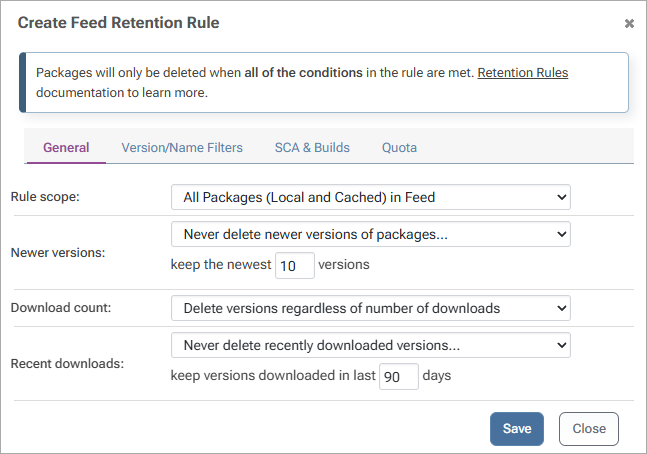
- Configure a retention rule to delete from Feed A after 90 days of no use.
After 90 days, packages will appear in Feed A as remote packages.
Retention Policies in ProGet
ProGet lets you configure Retention policies to manage disk space and control the cleanup of unused data.
Retention policies are parameters you can set to define what should and shouldn’t be kept. This lets you automate an otherwise manual process to spring clean your disk, saving disk space and your time:
Retention policies work with packages, assets, containers, and other ProGet features. Examples of retention policies you could set might include:
- Dump specified packages when only X size of disk space remains
- Dump specified package versions when a feed reaches X size
- Delete packages over X number of days old
You can also set a policy to avoid packages such as “X number of latest versions”, or target cached packages only:

When you activate this rule, you can do a “dry run”, letting you test retention rules without actual deletion, so you can make sure they work as intended without worrying about data loss.
Manage your Data Easily in ProGet
ProGet offers a modern approach to storage and retention policies to manage your data. It also allows you to do a dry run to make sure your policies are working as intended. It also offers it’s own solution for “cold storage” type setups.
If you haven’t read through the other articles in this migration guide then we encourage you to check them out, or why not get support with your migration from an expert at Inedo: