Managing your Users and Security

Managing Users and Security
Migrating users and groups is tough. You’re dealing with large volumes of user data and making sure all their access rights and permissions are set up correctly. ProGet structures users, groups, and permissions similar to Artifactory, making it easy to migrate users, especially if you’re using an Active Directory connected by LDAP.
In this article, we’ll look at how ProGet manages:
Users, Groups, and Permissions in ProGet
ProGet’s structure of Users, Groups and Permissions is similar to Artifactory, but a notable difference is how permissions are assigned in the admin interface, being configured on the Permissions page instead of User Group profiles:

You can manually create users and groups in ProGet, or easily migrate them with LDAP if you have an existing Active Directory of users.
If you’re already using SAML for your Authentication, this can also be configured in ProGet.
So, no need to worry about managing tons of user records when migrating. While Artifactory automatically creates user records, ProGet’s focus is on configuring permissions instead.
Configuring Permissions
In ProGet, all User and Group permissions are configured on the Permissions page, set up in a similar way to Artifactory, with Permissions assigned to each User and Group. ProGet is set up with default permissions for common configurations of access rights, such as Administration and Feed Management:
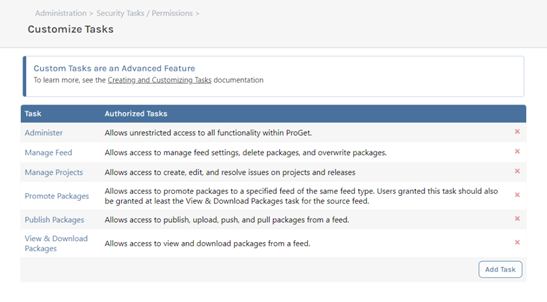
However, you can create customized permissions by either editing these or creating your own:

Global Roles
Unlike Artifactory, ProGet has no “Global Roles” for Projects as Permissions function as an adequate substitute. In ProGet, Feed Groups are like Projects in Artifactory, and can have Privileges assigned to them:

Path/Package Level Permissions
Unlike Artifactory, path/package-level permissions are not supported in ProGet, traditionally found in file-based systems, where ProGet is package-based. Multiple feeds with permissions represent a much better approach over outdated micromanaged file permissions.
Summary
Access rights are configured on the Permissions page in ProGet, centralizing your permissions, and migrating your user base is quick and easy, especially if you’re using LDAP to migrate your Active Directory.
Once ProGet is secure, the next step is to secure your software supply chain, which we cover in the next article on Vulnerability Management with Policies.