What are NuGet Package Vulnerabilities and How to Manage Them

What are NuGet Package Vulnerabilities and How to Manage Them
Run a NuGet package audit and you’ll almost certainly find vulnerabilities. With new issues being discovered in popular packages all the time, it’s easy to wonder whether your application is actually secure. The hard part is deciding which ones actually matter, which packages are safe for production, and what needs your attention.
Scanning your builds could return several vulnerability warnings, and lead to a bunch of questions:
- Does “Low severity” mean it’s safe?
- How about “High severity”, just how severe is it?
- What should we do about it? Do I even need to do anything at all?
It’s a lot to consider! In this article, I’ll explain NuGet vulnerabilities, how scanning works, and how organizations can manage them effectively at scale. I’ll then talk about using ProGet to handle your vulnerability management to prioritize the threats that need urgent remediation and reduce the flood of minimal-risk alerts.
What Are NuGet Package Vulnerabilities and Scanning Exactly?
NuGet package vulnerabilities are security weaknesses discovered in .NET packages and reported to a database like the GHSA, NVD and CVE. For example, Newtonsoft.Json has a vulnerability concerning “Improper Handling of Exceptional Conditions”:
Improper handling of expressions with high nesting level that lead to StackOverFlow exception or high CPU and RAM usage. Can result in Denial Of Service (DoS).
Not every package vulnerability is the result of unintentional coding flaws. Some are caused by deliberately injected malicious code, such as this well-known incident where multiple popular packages were compromised.
When you run dotnet list package -vulnerable or nuget audit, you’ll get a a list of these vulnerabilities and what package versions they affect:

Keep in mind that this only compares your NuGet packages against a database of reported vulnerabilities, not every vulnerability a package could have. This isn’t some kind of “virus scanning” and doesn’t guarantee your packages are free of vulnerabilities. It also only checks the GitHub Advisory Database, so vulnerabilities that exist only in other databases won’t be reported.
For the ones that do show up, the severity of these vulnerabilities doesn’t always reflect how you should handle them. Even though that Newtonsoft.Json vulnerability has a High severity score, it probably won’t be a real risk inside your applications:
Quite high nesting level (>10kk, or 9.5MB of {a:{a:{... input) is needed to achieve the latency over 10 seconds, depending on the hardware.
Wait… a 9.5MB malicious JSON document? For an application sitting behind your firewall, that’s probably not a real worry. The rated severity doesn’t up the chance of exploitation or the impact on your application, but it’s difficult to tell, since severity scores reflect hypothetical worst-case scenarios rather than the real-world risk in your environment.
Most vulnerabilities are not easily exploitable. If they require specific access rights or aren’t accessible through typical user interactions, the risk of exploitation is close to zero.
So, What Can We Do About NuGet Package Vulnerabilities?
First things first, don’t just mindlessly upgrade everything! Instead, your organization should establish scalable vulnerability management that includes:
✅ Regularly monitoring packages you use in production for updates
✅ Routinely monitoring security advisories like GHSA and NVD
✅ Using automated scanning tools to identify new package vulnerabilities
✅ Intentionally assessing NuGet vulnerabilities based on the real risk and impact they pose to your applications, instead of relying only on severity scores.
Not all package vulnerabilities detected pose a real-world threat to your environment, but upgrading could introduce new vulnerabilities or regressions in your apps.
But as projects scale, you’ll be pulling in more and more dependencies and seeing more and more vulnerability alerts, making the decision to upgrade seem unavoidable. After all, the only other option would be to ignore them right? You’d be surprised at how many developers take this route when the number of alerts becomes overwhelming, and the limited information they provide leaves you at a loss for what to do next. Alert fatigue sets in quickly when inundated with vulnerability notifications, with no way to suppress the noise.
For example, if you were to blindly upgrade Newtonsoft.Json to the latest version, you might end up with production errors due to how the new version deserializes objects. However, while sticking with any pre-13.0.1 versions of this packages only leaves you with vulnerabilities that pose minimal risk, ignoring alerts isn’t a mindset you’ll want to apply to every package, especially if they have the potential to be exploited in your applications.
What’s more, you can’t just rely on the NuGet client’s built-in-scanning. There’s simply no guidance for resolving detected NuGet vulnerabilities, and the implied advice is to just upgrade by default, so you’re just left with a mountain of vulnerability alerts without any information on what you need to prioritize.
This lack of context is the problem. When every vulnerability is treated with equal urgency, real risk falls by the wayside. In reality, the risk of exploitation and impact can vary widely depending on how a package is used. So, instead of reacting automatically, the better approach is to evaluate each case on its own merits.
💡Assess NuGet Package Vulnerabilities Case-by-Case
Instead of always upgrading, first, determine if the vulnerability should be worked around or simply ignored. The reported vulnerability may simply not impact your application.
Will there even be an opportunity for a malicious actor to inject a 9.5MB JSON file? What are the consequences of Denial-of-Service attack on our application?
While the built-in NuGet vulnerability feature is helpful, it should not be your sole source of information. Combine data from various sources, such as the National Vulnerability Database and Inedo Security Labs, and conduct independent assessments of each package in the context of our applications.
💡Be consistent in your Assessments
In large organization’s, vulnerability assessments need to be both repeatable and clearly documented. Think about it: an assessment is someone’s subjective take on a vulnerability as a given point in time, and evolving threats and personal knowledge can even alter an individual’s judgement over time.
Why Vulnerability Management Becomes Difficult at Scale
So, manually assessing NuGet package vulnerabilities takes time and effort. For each vulnerability you’ll need to:
- Research potential risks and how they apply to your applications
- Decide on what course of action to take
- Communicate this information to the rest of your team (or your future self)
These steps prevent redundant work when the same vulnerability appears again, but when you’re facing hundreds of vulnerability alerts for your latest build, carrying out manual assessments quickly becomes an insurmountable task. Teams can spend too much time reviewing vulnerabilities that pose little impact, and after a while, it becomes harder to tell what vulnerabilities need to be prioritized, and what can safely wait.
With all this effort in mind it’s easy to give up and think should I just not bother at all?
No! You should still scan your packages and assess the reported vulnerabilities on a case-by-case basis. Sure, most vulnerabilities have no real risk, but do you really want that one bad package slipping through?
That’s where ProGet’s automated vulnerability management can help, taking much of the manual work out of the process, highlighting what vulnerabilities your teams need to focus on, while suppressing the noise from the hundreds that they don’t.
Vulnerability Management in ProGet
As teams and projects grow, it’s easy to end up with thousands of packages, and consequently, thousands of vulnerability alerts. Keeping track of and assessing all these known and newly discovered vulnerabilities quickly becomes unmanageable, especially when developers don’t know which alerts are real risks that need prioritizing, and which alerts are just noise.
ProGet helps you suppress the noise, automatically identifying and categorizing the vulnerabilities in your builds, so you know which ones need handling with urgency. It can also suppress noisy alerts, so teams can focus on the vulnerabilities that matter, instead of fatiguing from having to triage hundreds of vulnerabilities manually.
By comparing vulnerabilities against our aggregated database of vulnerability records and categorizing them from 1 to 5 to indicate remediation urgency. From category 1 vulnerabilities which pose minimal real-world risk and are safe to address in a major release, to category 5 vulnerabilities which require immediate attention, ProGet lets you know when to upgrade:

But teams can’t solely rely on automation. Alerts still need to be investigated, researched, and assessed by devs when a risk is identified. You don’t want to be trawling through thousands of alerts every time, so ProGet lets you change the emitted severity of vulnerabilities, suppressing the noise from alerts posing minimal risk:
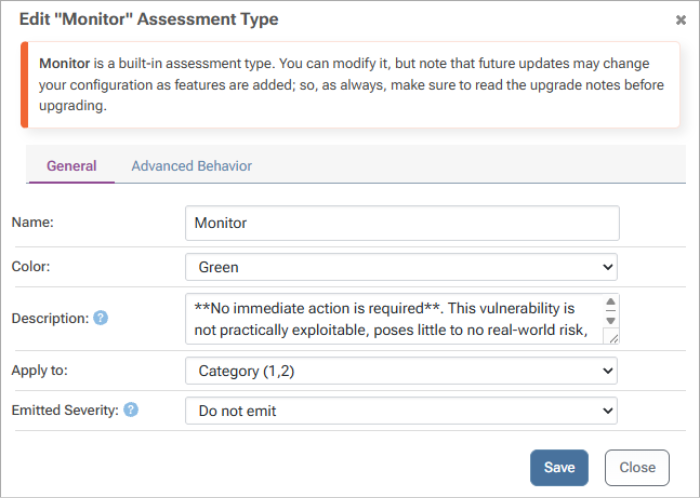
This lets you control what alerts appear in the NuGet CLI, highlighting the risks that truly need attention, while preventing those that can be ignored from distracting developers.
Take Microsoft.AspNETCore.App 2.2.0. Older versions of this package contain a spoofing vulnerability, which if service outages, data breaches, and data tampering are disruptive risk factors within your environment, can pose a serious threat:

But for applications where these risks are tolerable, the vulnerability carries minimal real-world risk:

If a vulnerability is truly risky in your environment, being swamped in alerts can easily pull dev focus away from these true threats. Suppressing alerts prevents noise from minimal risks from drowning out the vulnerabilities that need urgent remediation.
Conclusion
As your organization grows, vulnerabilities shouldn’t be a concern to your applications as long as you know what to do. It’s about assessing vulnerabilities based on their potential risk and impact, and ensuring the focus is kept to the real risks, instead of devs burning out fighting against a tirade of alerts.
This will involve assessing individual vulnerabilities with intention over mindless upgrading, and ProGet’s categories and noise suppression tells your devs where to focus, to ensure that the risky vulnerabilities are the ones addressed.
To keep your apps secure, consistent vulnerability management is paramount, so implement an approval flow for your NuGet packages, covered in the next article, Why You Should Create a Package Approval Flow for NuGet.org.