Managing Users, Security, & API Keys

Managing Users, Permissions, & API Keys
Migrating to ProGet includes configuring users, groups, permissions, and API keys for both developers and automation workflows.
Sonatype and ProGet use similar role- and privilege-based access models, but differ in how permissions and repository access are organized. This article covers:
- Users and group management
- Feed-level permissions
- API key management
- Migrating existing Sonatype access configurations
Users, Permissions, and API Keys
Sonatype manages access through roles and privileges, where privileges define actions and roles group permissions for users or teams.
API keys are tied to user privileges and are commonly used for automation and repository access. Once generated, Sonatype keys cannot be viewed or exported again, requiring organizations to store them securely after creation.
Sonatype also supports Content Selectors, which restrict access to specific package patterns within repositories. For example, users may be granted access to some package namespaces while being restricted from others within the same repository.
While flexible, this model can become difficult to manage as repositories and teams scale.
Common challenges include:
- Inconsistent dependency visibility across teams
- Increased permission complexity
- Nested role management overhead
- Repository access behavior that differs between users working on the same project
Feed-Based Permissions in ProGet
ProGet also uses roles and privileges but organizes repository access around feeds.
Permissions are typically managed at the feed level, providing a simpler access model aligned to team- or project-based repository management workflows.
ProGet supports integration with:
- Active Directory
- LDAP
- SAML-based authentication providers
This allows organizations to map existing users and groups into ProGet without rebuilding access structures manually.
Unlike Sonatype Content Selectors, ProGet uses feed-level access permissions instead of package-pattern restrictions within repositories. This creates a more consistent access model across feeds and projects.
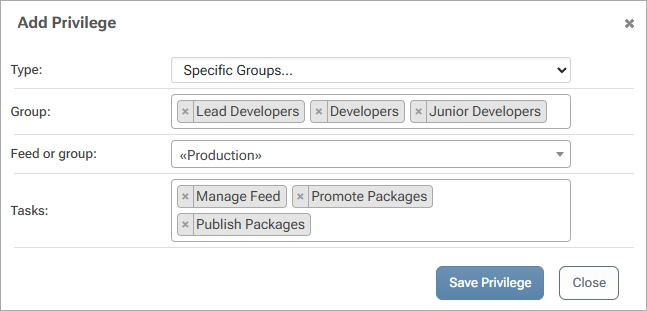
Managing Users and Permissions
Users and groups can be created directly in ProGet or synchronized from external directory services.
Permissions are managed through the Permissions page, where administrators can:
- Assign access to users and groups
- Configure feed permissions
- Manage administrative privileges
- Customize permission sets for different workflows

ProGet includes default permission groups such as Administration and Feed Management.

While also allowing organizations to create custom permission configurations as needed.

Managing API Keys
API keys in ProGet can be created and managed through:
- The ProGet web UI
- The pgutil command-line tool
- The HTTP API
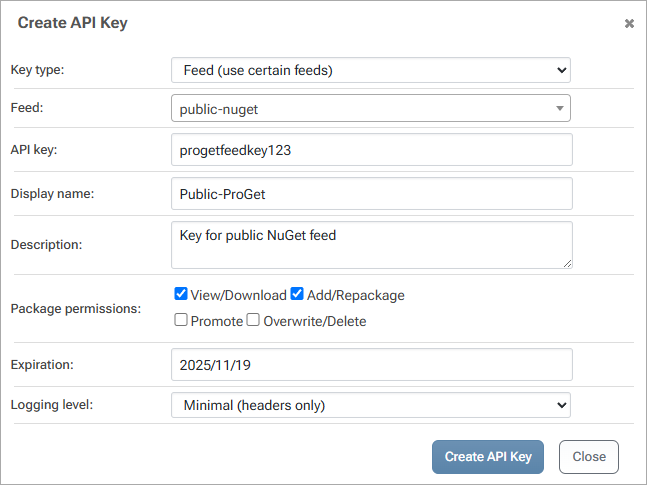
ProGet supports three API key types:
- System Keys – Full-instance access for automation and configuration workflows.

- Feed Keys – Access scoped to specific feeds or feed groups.
- Personal Keys – User-scoped keys tied to individual permissions.

Users can manage their own personal keys, while administrators maintain visibility and control across system and feed keys.

Migrating Sonatype API Keys
Existing Sonatype API keys can often be reused during migration.
To migrate a key:
1. Create a new API key in ProGet

2. Select the appropriate key type
3. Configure the required permissions
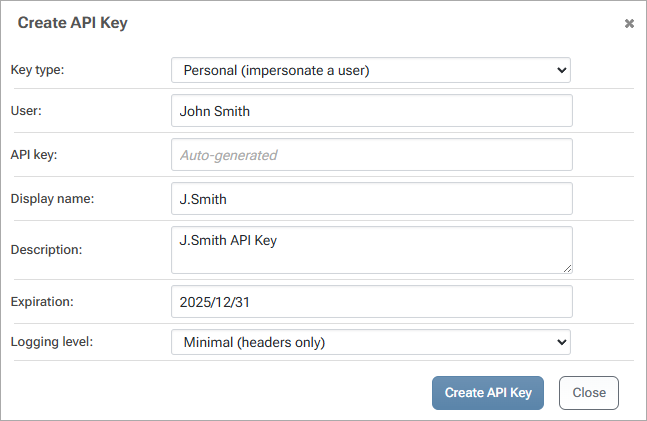
4. Paste the existing Sonatype key value into ProGet
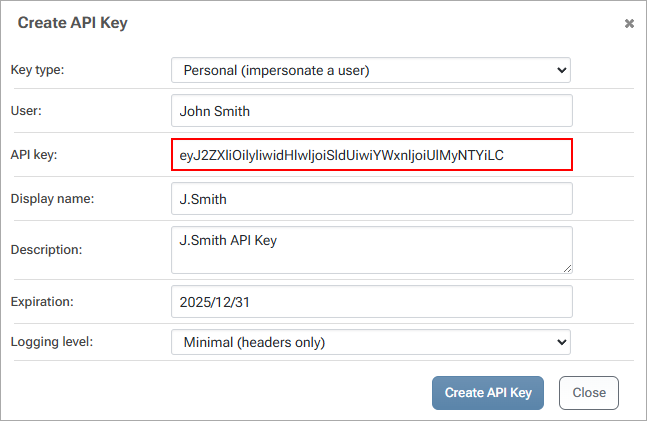
This allows existing automation scripts and integrations to continue functioning without requiring key regeneration or widespread configuration changes.
Managing Access in ProGet
ProGet centralizes user management, permissions, and API key administration within a feed-based access model.
By using feed-level permissions, directory integrations, and reusable API keys, organizations can simplify repository access management while maintaining existing automation and security workflows during migration.
This provides the foundation for broader governance over package usage. The next article builds on this by introducing Policies and Software Composition Analysis (SCA) in ProGet, including how build-time scanning and policy enforcement are used to manage vulnerability and license risk at the registry level.