Repositories in ProGet

Repositories in ProGet
ProGet calls repositories feeds. Instead of different repository types (local, remote, etc), ProGet has just one, configured based on your needs.
Feeds provide package storage and distribution, and allow packages to be proxied using connectors.
This article covers:
- How feeds compare to Artifactory repositories
- How connectors work in ProGet
- Configuring different Artifactory repository types using Feeds
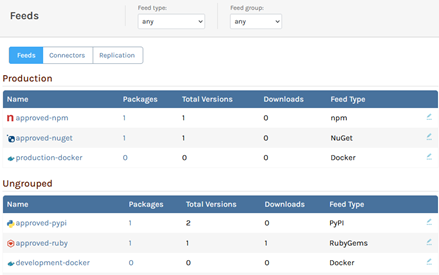
ProGet Feeds
Instead of separate repository types like local, remote, or virtual, ProGet uses feeds. Feeds can be used to:
Instead of having a remote repository used to proxy packages from nuget.org you’ll create a ProGet feed configured with a connector to proxy NuGet packages.
Connectors
Connectors let you proxy packages from other sources, including:

In Artifactory you push to local repositories you create, which are combined with remote repositories connected to public galleries to form virtual repositories you can pull from.
Instead of configuring several repositories, a single ProGet feed and connector can accomplish the same, covering all feed types found in Artifactory.
New ProGet feeds can be configured to proxy packages from an external source:
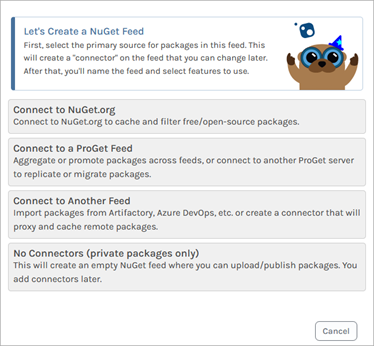
Once set up, you’ll immediately be able to see a list of available proxy packages from the configured source:

Feed Configuration
Basic feed configurations can be used to replicate Artifactory repository patterns.
| Artifactory | ProGet |
| Local Repository | Feed with no Connectors |
| Remote Repository | Feed with Connector to another Repository |
| Virtual Repository | Feed with Connectors to multiple Repositories |
| Smart Repository | Feed with Connector to another ProGet Feed |
| Federated Repository | Feed with Replication |
Other Artifactory Repository Types in ProGet
ProGet can also replicate other Artifactory repository types:
Release Bundle Repositories
In Artifactory you can securely store artifacts in Release Bundle Repositories. In ProGet you can configure feeds with permissions, so only authorized users can access the packages stored.
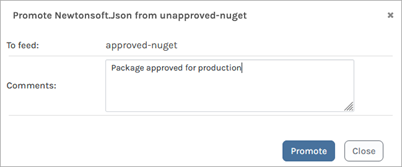
Then use Package Promotion to copy packages that you don’t want edited or removed from other feeds.
Generic Repositories
Artifactory Generic Repositories can store any file type. ProGet Asset Directories serve the same purpose and files can be managed easily using ProGet’s API.
You can also create Universal Packages to package applications and components directly, which can be deployed uniformly across different environments.
Conclusion
ProGet’s configurable feeds support package hosting and proxying.
Connectors can be set up to proxy from open-source galleries, and feeds can also be used to proxy from other feeds and external repositories.
After migrating repositories to ProGet you can secure your packages through package promotion and store other file types in asset directories. Why we choose packages over files is covered in our next article, The File and Package Mindset.